Join an event and follow your registration
Learn how to get a place, join a waiting list, withdraw and understand your meetRackets notifications.
Step by step
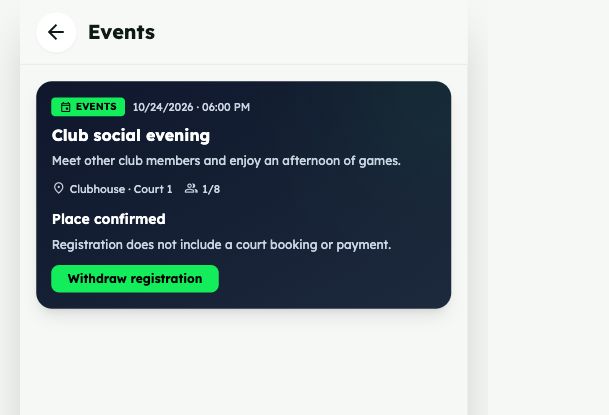
- Open the event from club updates, the news feed with the Events filter or a notification. Check its date, time, location and participation conditions.
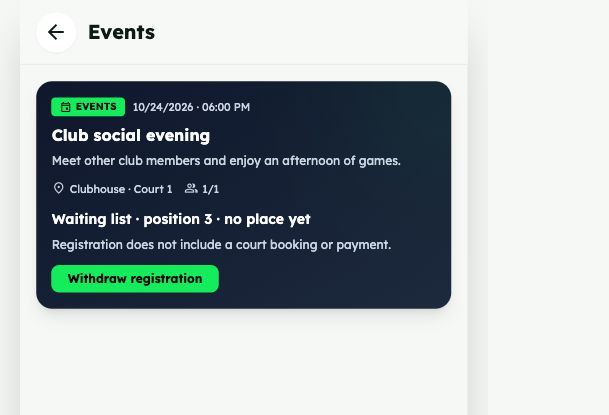
- If places are available, tap Register and check for Place confirmed. If it is full, tap Join waiting list: your position is shown together with a message that you do not have a place yet.
- Reopen the event to check your status. To leave, tap Withdraw registration. You can withdraw from a confirmed place or the waiting list, including when registration is closed.
Example screens
Real app screenshots with demo data. Select an image to view it at full size.
Frequently asked questions
Does registering always mean I have a place?
Only Place confirmed means you have a place. Waiting list records your request without guaranteeing participation. The capacity counter counts confirmed places.
How does the waiting list work?
Requests are ordered by when they were made. Your position is shown on the event. When a place opens, capacity increases or registration reopens with space available, the first eligible waiting person is promoted automatically. Reopen the event to see your current position.
Do I need to accept a promoted place?
Promotion confirms your place automatically and sends a notification. No second acceptance is needed. If you can no longer attend, withdraw to make room for someone else.
What happens if I leave and register again?
Withdrawing releases your place or removes your waiting position. Registering again is a new request; your earlier waiting position is not kept.
Why can I not register?
Registration may be closed, the event may be cancelled or already started, or it may be unavailable to your account. Club-only events require active membership. A full event still accepts waiting requests while registration remains open.
What happens when registration closes?
Confirmed places and the waiting list are kept, but new requests and promotions pause. You can still withdraw. When the club reopens registration, the queue is processed according to available places.
What if the event changes or is cancelled?
Confirmed and waiting participants are notified about changes to date, time or location, and about cancellation. Cancelled events retain history and accept no new requests or promotions.
Can I see the names of other participants?
The management list with names and registration timestamps is restricted to club owners and administrators. Players see capacity and their own status and position.
Can I subscribe to new club events?
As a club member you can receive invitations. Enable New club events in notification settings. This is not a paid subscription or automatic registration: join each event that interests you yourself.
Which notifications are sent and who receives them
| Notification | Who receives it and when |
|---|---|
| New club event | Active club members except the author, if New club events is enabled. No automatic platform-wide invitation is sent. |
| Place confirmed | The person who registers and gets a place. It confirms participation. |
| Waiting list entry | The person requesting the queue. It states that there is no place yet and includes their position. |
| Withdrawal confirmed | The withdrawing person. It confirms no remaining place or waiting position. |
| Place obtained from the queue | The promoted person, as soon as a place is confirmed. Includes the event, date, time and venue. |
| Date, time or venue changed | Confirmed and waiting participants. Shows the previous and new details. Minor text or image corrections do not generate this notice. |
| Cancellation | Confirmed and waiting participants are told that the event is cancelled. |
| 24-hour reminder | Confirmed participants only. Excludes waiting or withdrawn users and cancelled events. Confirmation suffices for joins or promotions in the final 24 hours; no redundant immediate reminder is added. Rescheduling updates the reminder. |
| Movements and full capacity | Current club owners and administrators, according to the event setting: off, full only or also joins and withdrawals. Former managers no longer receive management alerts. |
Configure notifications
Notifications are stored inside meetRackets and can also arrive by push. New club events controls invitations; turning it off stops generating these invitations for your account. Push for your events controls registration and organizer pushes; turning it off keeps in-app history. Push requires permission and a connected browser/device. Set up each device separately. Notices open the specific event or its management, depending on the recipient. These event notices are not sent by email, SMS or WhatsApp.
Missing a push? Check the in-app notifications and your current registration first. Check both event settings, browser/system permission and that device’s connection. A queued notice can be discarded if a withdrawal, cancellation or date/venue change has made it outdated.